
Touring homes this weekend?
Don't trust your memory.
Property Notepad is the free app for anyone house hunting — capture every showing as it happens, then compare your options side by side when it's time to decide.
Every showing feels unforgettable — until the next one
Walking into a house, you're sure you'll remember it: the layout, the light, that weird smell in the basement. Then you tour three more that same weekend, and by Sunday night they've all merged into one blurry impression. Now you're trying to make the biggest financial decision of your life off vibes and a camera roll with no context.
Notes live nowhere
Texts to yourself, voice memos on your phone, impressions you meant to write down and didn't.
Every house blurs together
By the third or fourth showing, the kitchens start looking the same and the details stop sticking.
Comparing means guessing
Without a real record, picking a favorite is really just picking whichever one you remember best.
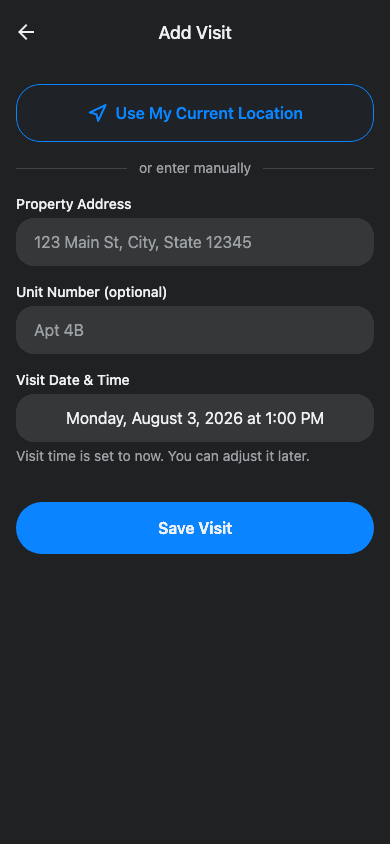
How touring with Property Notepad works
Four steps, and you're never relying on memory again.
- 1
Find your next showing
Browse real open houses pulled straight from the MLS, or add any address yourself the moment you walk up.
- 2
Walk in, start capturing
Take notes, snap photos, and record voice memos hands-free as you move through the house.
- 3
Score what matters to you
Rate each property on your own criteria, so your preferences become real data, not a vague feeling.
- 4
Compare and decide
Get an AI summary of each visit, build a shortlist, and compare your top homes side by side.
Rate what actually matters to you
Every buyer's list looks different. Maybe it's natural light and a short commute. Maybe it's the kitchen and a big backyard. Build your own scorecard once, then score every property you tour against the exact same criteria — so you're comparing homes on what you actually care about, not just first impressions.
- Add, remove, and reorder your own criteria — no generic checklist
- Rank homes by what's most important to you, so you stay focused on your must-haves instead of getting swept up in staging
- Score together with a spouse or co-buyer, so you're deciding from the same real data instead of two different memories
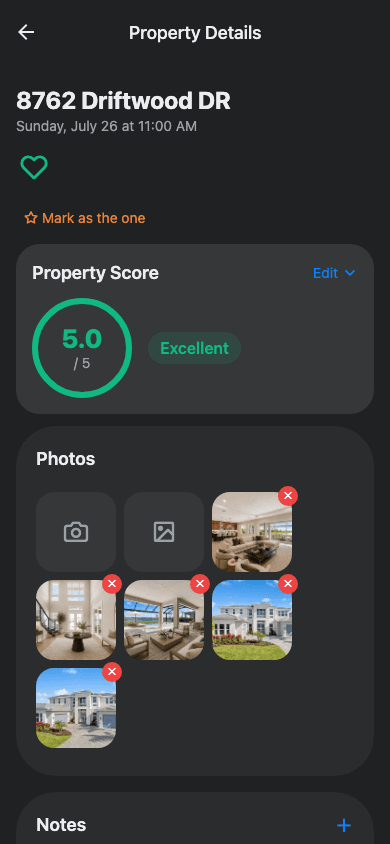
Everything you need at a showing
Less stress, better decisions. Keep all your showing notes in one place.
One-Tap Address Fill
Standing at a showing? Tap once to fill in the address from your location and start taking notes.
Voice Memos
Record thoughts hands-free while walking through rooms.
Photo Documentation
Capture and organize photos by property visit.
Smart Scoring
Rate properties on criteria that matter most to you.
Shortlist & Compare
Mark favorites and compare properties side by side.
Collaborate Together
Share notebooks with co-buyers, family, or your agent.
Buyer's remorse starts at showing #2
When you can't remember why you liked (or passed on) a home, you either settle for the one you saw most recently, or you keep touring past the point of decision fatigue — second-guessing yourself the whole way to closing.
Walk into closing sure of your choice
When every showing is captured and scored, picking "the one" isn't a leap of faith — it's just reading back your own notes and seeing the clear winner.
Ready for your next showing?
It's free, takes two minutes to set up, and might just save you from second-guessing the wrong house.