
Tour Smarter,
Decide Faster
The easiest way to organize your showing notes and find your perfect home.
Free to use. No password needed to get started.

Scan to get the iPhone app
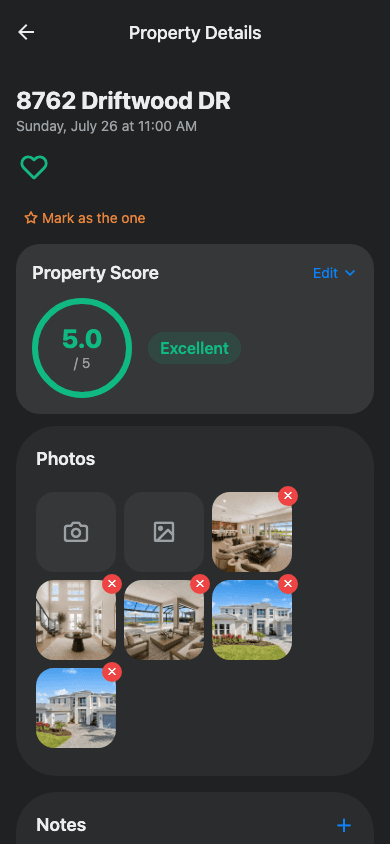
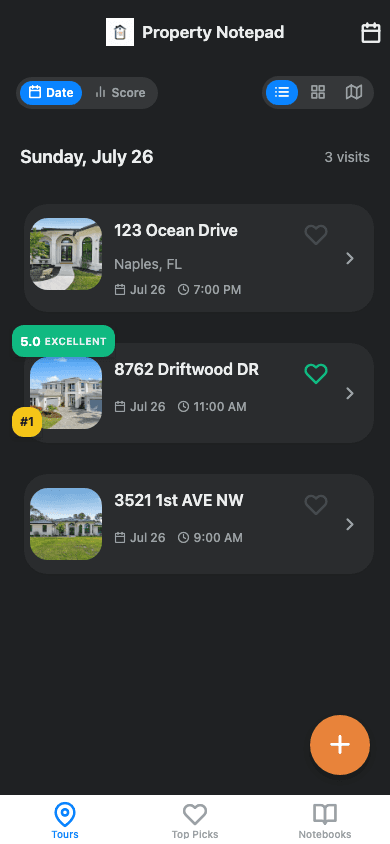
After the fifth showing, they all blur together
You walk into a home, love the kitchen, forget the address. Three showings later you can't remember which house had the good light or the noisy street. You're about to make one of the biggest purchases of your life off a foggy memory and a camera roll full of unlabeled photos.
Notes scattered everywhere
Texts to yourself, photos with no context, half-remembered impressions from a week ago.
Showings blur together
By the fourth or fifth house, the details stop sticking and every kitchen looks the same.
Decisions made on guesswork
Without a clear record, you're comparing homes from memory instead of from what actually happened.
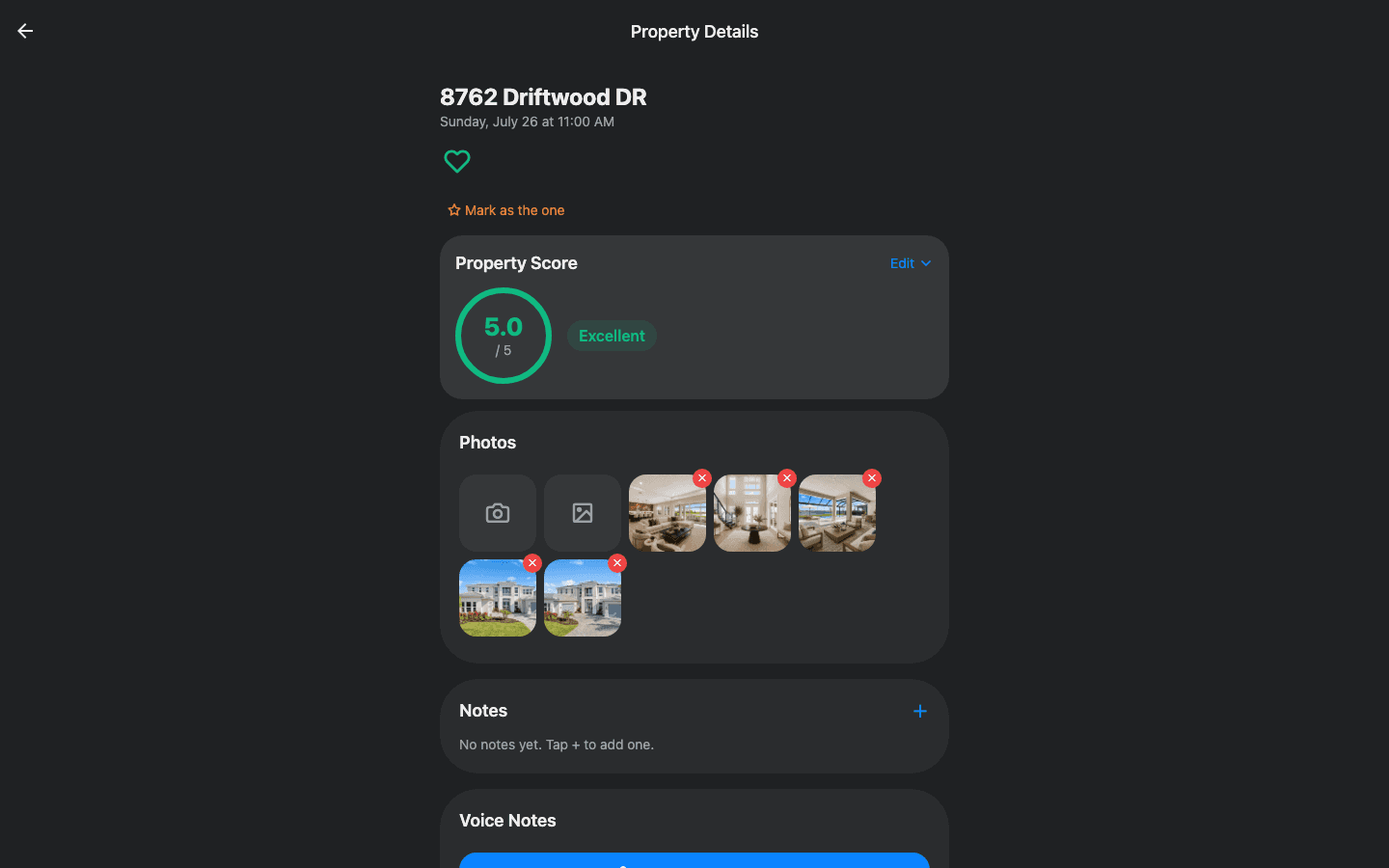
One notebook, every device
Capture on your phone during a showing, review on the web when you're back home — same notebook, either way.
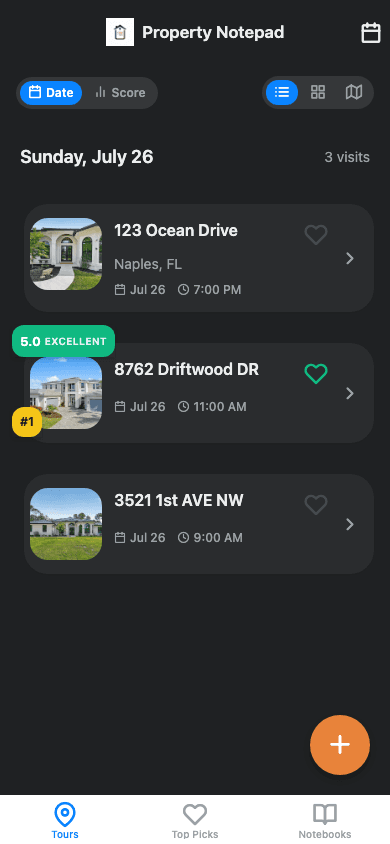
Everything you need at a showing
Less stress, better decisions. Keep all your showing notes in one place.
One-Tap Address Fill
Standing at a showing? Tap once to fill in the address from your location and start taking notes.
Voice Memos
Record thoughts hands-free while walking through rooms.
Photo Documentation
Capture and organize photos by property visit.
Smart Scoring
Rate properties on criteria that matter most to you.
Shortlist & Compare
Mark favorites and compare properties side by side.
Collaborate Together
Share notebooks with co-buyers, family, or your agent.
Why not just use your camera roll?
You're already carrying your phone at every showing. Property Notepad just uses it better.
| Capability | Property Notepad | Texts, photos & memory |
|---|---|---|
| Notes stay tied to the exact property | ||
| Score every home on the same criteria | ||
| Voice memos captured hands-free | ||
| Compare showings side by side | ||
| Live open house data pulled from the MLS | ||
| Share with your agent or co-buyer |
How it works
From finding a home to a final decision, in four steps.
- 1
Find homes to tour
Browse real open houses near you, pulled straight from the MLS, and pick which ones to hit this weekend.
- 2
Add a property
Each stop gets added automatically, or enter an address yourself the moment you walk up to a showing.
- 3
Capture everything
Take notes, snap photos, record voice memos, and score the property on what matters to you.
- 4
Compare & decide
Get an AI summary of each visit, build a shortlist, and compare homes side by side to find the one.
Frequently asked questions
What is Property Notepad?
Property Notepad is a mobile app that helps home buyers capture, organize, and rank properties during the home-buying process. You can take notes, record voice memos, snap photos, and score each property you tour, then compare them side by side to decide which one is right for you.
How can I keep track of all the homes I've seen?
The simplest way is an app built for exactly this, rather than a spreadsheet or your camera roll. Property Notepad logs each showing as you visit it, so notes, photos, and voice memos stay tied to the right address automatically, and every home gets scored the same way so you can compare them side by side later instead of relying on memory.
Is Property Notepad free?
Yes, Property Notepad is free to use. Sign in with just your email, no password required.
Do I need my real estate agent to use it?
No. Property Notepad is built for buyers first. You can optionally share a notebook with your agent, co-buyer, or family so everyone's notes on a property are in one place.
Does Property Notepad work during a showing without service?
You can take notes, photos, and voice memos at a showing and they sync as soon as you're back online, so spotty cell service at a property won't stop you from capturing details.
Can multiple people collaborate on the same property notes?
Yes. Property Notepad supports shared notebooks so co-buyers, family members, or your agent can all add notes, photos, and scores to the same property visit.
Is my data private?
Your notes, photos, and voice memos are tied to your account and the notebooks you choose to share them with. They are not made public or shared with third parties.
Does Property Notepad work on iPhone and Android?
Property Notepad is built with Expo/React Native and works on iOS, Android, and the web.
What should I bring to an open house or showing?
Your phone is really all you need. Instead of a paper notebook, tape measure notes, or scattered camera roll photos, Property Notepad captures notes, photos, voice memos, and a score for every property in one place, tied to the exact address and time you visited.
What questions should I ask at a showing?
Good ones to cover: age and condition of the roof, HVAC, and water heater; recent repairs or renovations; monthly HOA fees; property taxes; how long it's been on the market; and why the sellers are moving. Property Notepad lets you save these as scorecard criteria so you rate every property on the same questions and compare answers side by side afterward.
Do I have to plan which homes I'll see, or can I just stop by open houses I drive past?
You don't need to plan ahead. If you're driving around a neighborhood and see an open house sign, tap "Use My Current Location" in Property Notepad to add that property on the spot, no pre-searching required. It works exactly the same as a showing you booked in advance, and you can still browse and plan MLS-listed open houses ahead of time for the ones you want to be sure not to miss.
Touring this weekend? Read our open house checklist or see what questions to ask.
Ready to tour smarter?
Start capturing your showing notes in the next home you walk into.
Open Property NotepadScan to get the iPhone app